IDS 806
806 Keypad
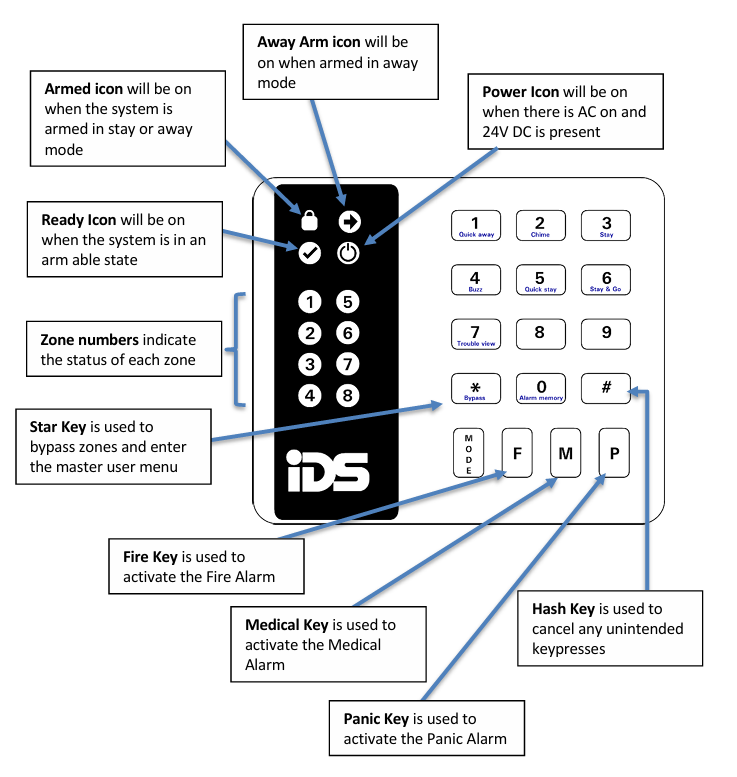
Overview
Understanding the Keypad Indicators
Away Arming
- Ensure that the Ready icon is on; if not, check that all protected doors and windows are closed, and that motion has ceased in areas with motion detectors.
- If necessary, close the front door.
- Press the # key to cancel any unintended key entries.
- Enter a valid 4 digit [USER CODE]. If you make a mistake, press the # key and re-enter the code.
- The ARMED icon will come on and the keypad will beep for the duration of the exit delay. A steadily lit zone indicator will show any bypassed zones.
- The arming process has begun. Leave only via the Follower and Entry/Exit zones.
- The panel will arm at the end of the exit delay.
Stay Arming
- Ensure that the Ready icon is on; if not, check that all protected doors and windows are closed, and that motion has ceased in areas with motion detectors.
- If necessary, close the front door.
- Hold down the 5 key until the beep
Zone Bypassing
- The term BYPASS is used to describe a zone that has been deactivated for the armed cycle; i.e. violation of a bypassed zone will not cause an alarm.
- Is used when access is needed to a protected area while the system is armed.
- Zones cannot be bypassed once the system is armed.
- Bypassed zones are automatically cancelled each time the system is disarmed and must be re-bypassed before the next arming.
How to Bypass a Zone
- Press the * key (while bypassing zones, violated zones will be flashing).
- Press the number corresponding to the zone you need to bypass e.g. the 2 key if you wish to bypass zone 2.
- The relevant zone indicator will come on to indicate that the zone is now bypassed.
- Repeat steps 1 and 2 to bypass any other zones.
NOTE:
Panic zones cannot be bypassed
How to Un-bypass a Zone
- Press the * key.
- Press the number corresponding to the currently bypassed zone
- The zone indicator will turn off - the zone is now active.
How to Disarm
To disarm the system, enter a valid [USER CODE] before the expiry of the entry delay.
Although not essential, it is recommended that the # key be pressed before entering a user code as this clears any unintended key entries.
- Enter the premises through a designated Entry/Exit door or an alarm will occur.
- As soon as the Entry/Exit zone is violated i.e. the door has been opened, the entry delay begins, and follower zones become in-active.
- The keypad buzzer will sound until a valid user code is entered or entry time runs down. If the entry period is too short, have your installer change the entry time.
- If the ARMED indicator remains lit, an error was made while entering the user code, press the [#] key, and re-enter the code.
- Once the system disarms, the ARMED indicator and the entry sound will turn off.
- If no valid user code has been entered by the end of the entry delay period, an alarm condition will be registered.
- If four incorrect user codes are entered consecutively while either arming or disarming the system, the keypad will be non-responsive for 30 seconds. Your monitoring company will also be notified on a keypad tamper.
Note:
- If the ARMED indicator is flashing upon entry, there has been a violation. The intruder may still be inside! Call for assistance.
- If a strobe (or flashing light) has been installed and an alarm condition is registered, the light will continue flashing until a valid [USER CODE] is entered.
Related Articles
IDS X64
Understanding the Keypads Curve LCD Keypad Classic LED Keypad Curve LED Keypad LED Indicators How to Arm Ensure that the READY LED is on. If not, check that all protected doors and windows are closed and that all movement has ceased in areas covered ...IDS 805
Understanding Keypad Indicators Feedback Indicators Keys Away Arming Away arming is when the system arms with all entry / exit zones actively monitoring any violations, to trigger the entry / exit cycle. The entry / exit cycle is the time programmed ...